#📖 The RAG Techniques Book is HERE
The super extended version of this repository. The book goes far beyond the notebooks: the intuition behind every technique, side-by-side comparisons showing when each approach wins (and when it quietly fails), and illustrations that make the tricky parts finally click.
🎟 PDF + EPUB. GitHub community price: 33% off with code RAGKING. An Amazon Bestseller in Generative AI (hit #1 in Generative AI on Amazon at launch).
#👉 Get RAG Made Simple (33% off with code RAGKING)

#Building Agentic RAG Pipelines for Financial Document Analysis with Contextual AI 🚀

Building Retrieval-Augmented Generation (RAG) pipelines can seem daunting, with lots of moving parts and custom logic. In this tutorial, you'll learn how to quickly set up RAG agents using Contextual AI’s managed platform. You'll also get hands-on with several of the agent's core components—like the Parser, Reranker, Grounded Language Model, and LMUnit—so you can see how each part works in practice.
#🎯 What You'll Build
In this hands-on tutorial, you'll explore core RAG techniques with Contextual AI while creating an agent for financial document analysis and quantitative reasoning from scratch.
#Learning Outcomes
By completing this tutorial, you'll learn how to leverage agentic RAG to solve more complex queries. The agentic nature lies in the system's ability to autonomously analyze incoming queries, determine what reformulation strategy is needed, and execute that strategy without explicit user instruction.
Traditional RAG systems take queries as-is, often leading to poor retrievals for ambiguous, context-lacking, or complex queries. Agentic RAG intelligently preprocesses queries to bridge this gap. In the query path, the primary agentic step is query reformulation, comprising multi-turn, query expansion, or query decomposition. This query reformulation step is critical to obtaining the most robust RAG results, and is one component of a system engineered to generate the most accurate query responses.
In query reformulation, context is added or queries are restructured from the original input: for multi-turn, adding iterative dialogue context; for query expansion, adding additional context to help a short query return optimal results; for query decomposition, taking complex multi-faceted queries that require reasoning across several unrelated documents, and breaking them down into several sub-queries that help obtain the most relevant retrievals. This agentic component handles all of this reformulation autonomously, augmenting the user's query to help obtain the response they need.

You will set up your Agentic RAG system by learning to:
- Configure document datastores with indexing tuned for RAG performance
- Deploy production-ready agents with robust instructions and safeguards
- Query the system interactively using natural language while maintaining strict grounding
- Continuously validate and improve your pipeline with automated testing and performance metrics
You’ll also gain practical experience with four fundamental RAG components in Contextual AI:
- Parser – Ingest and structure heterogeneous documents (reports, tables, figures) for retrieval.
- Reranker – Dynamically select the most relevant evidence to ensure precise grounding.
- Grounded Language Model (GLM) – Generate factual, source-backed responses using the retrieved context.
- Language Model Unit Tests (LMUnits) – Automatically evaluate and optimize the accuracy, grounding, and reliability of your agent.
⏱️ This tutorial runs end-to-end in under 15 minutes. Every step can also be done via GUI for a no-code RAG workflow.
#Building a RAG Agent from Scratch
Before diving into individual RAG techniques, let’s build a complete RAG agent end-to-end from scratch.
#🛠️ Environment Setup
First, we'll install the required dependencies and set up our development environment. The contextual-client library provides Python bindings for the Contextual AI platform, while the additional packages support data visualization and progress tracking.
# Install required packages for Contextual AI integration and data visualization
%pip install contextual-client matplotlib tqdm requests pandas dotenv
Next, we'll import the necessary libraries that we'll use throughout this tutorial:
import os
import json
import requests
from pathlib import Path
from typing import List, Optional, Dict
from IPython.display import display, JSON
import pandas as pd
from contextual import ContextualAI
import ast
from IPython.display import display, Markdown
from tqdm import tqdm
import numpy as np
import matplotlib.pyplot as plt#🔑 Step 1: API Authentication Setup
#Getting Your Contextual AI API Key
Before we can start building our RAG agent, you'll need access to the Contextual AI platform.
If you do not have an account yet, you can create a workspace with a 30-day free trial of an agent and datastore.
#Step-by-Step API Key Setup:
- Create Your Account: Visit app.contextual.ai and click the "Start Free" button
- Navigate to API Keys: Once logged in, find "API Keys" in the sidebar
- Generate New Key: Click "Create API Key" and follow the setup steps
- Store Securely: Copy your API key and store it safely (you won't be able to see it again)

#Configuring Your API Key
To run this tutorial, you can store your API key in a .env file. This keeps your keys separate from your code. After setting up your .env file, you can load the API key from .env to initialize the Contextual AI client.
# Load API key from .env
from dotenv import load_dotenv
import os
load_dotenv()

# Initialize with your API key
API_KEY = os.getenv("CONTEXTUAL_API_KEY")
client = ContextualAI(
    api_key=API_KEY
)#📊 Step 2: Create Your Document Datastore
#Understanding Datastores
A datastore in Contextual AI is a secure, isolated container for your documents and their processed representations. Each datastore provides:
- Isolated Storage: Documents are kept separate and secure for each use case
- Intelligent Processing: Automatic parsing, chunking, and indexing of uploaded documents
- Optimized Retrieval: High-performance search and ranking capabilities
Let's create a datastore for our financial document analysis agent:
datastore_name = 'Financial_Demo_RAG'

# Check if datastore exists
datastores = client.datastores.list()
existing_datastore = next((ds for ds in datastores if ds.name == datastore_name), None)

if existing_datastore:
    datastore_id = existing_datastore.id
    print(f"Using existing datastore with ID: {datastore_id}")
else:
    result = client.datastores.create(name=datastore_name)
    datastore_id = result.id
    print(f"Created new datastore with ID: {datastore_id}")
Created new datastore with ID: 1335c317-61a1-4aad-8a97-ac6a6cdedc8b
#📄 Step 3: Document Ingestion and Processing
Now that your agent's datastore is set up, let's add some financial documents to it. Contextual AI's document processing engine provides enterprise-grade parsing that expertly handles:
- Complex Tables: Financial data, spreadsheets, and structured information
- Charts and Graphs: Visual data extraction and interpretation
- Multi-page Documents: Long reports with hierarchical structure
For this tutorial, we'll use sample financial documents that demonstrate various challenging scenarios:
import os
import requests

# Create data directory if it doesn't exist
if not os.path.exists('data'):
    os.makedirs('data')

# File list with corresponding GitHub URLs
files_to_upload = [
    # NVIDIA quarterly revnue 24/25
    ("A_Rev_by_Mkt_Qtrly_Trend_Q425.pdf", "https://raw.githubusercontent.com/ContextualAI/examples/refs/heads/main/08-ai-workshop/data/A_Rev_by_Mkt_Qtrly_Trend_Q425.pdf"),
    # NVIDIA quarterly revenue 22/23
    ("B_Q423-Qtrly-Revenue-by-Market-slide.pdf", "https://raw.githubusercontent.com/ContextualAI/examples/refs/heads/main/08-ai-workshop/data/B_Q423-Qtrly-Revenue-by-Market-slide.pdf"),
    # Spurious correlations report - fun example of graphs and statistical analysis
    ("C_Neptune.pdf", "https://raw.githubusercontent.com/ContextualAI/examples/refs/heads/main/08-ai-workshop/data/C_Neptune.pdf"),
    # Another spurious correlations report - fun example of graphs and statistical analysis
    ("D_Unilever.pdf", "https://raw.githubusercontent.com/ContextualAI/examples/refs/heads/main/08-ai-workshop/data/D_Unilever.pdf")
]#Document Download and Ingestion Process
The following cell downloads example documents locally from the GitHub links above, uploads them to Contextual AI, and tracks their processing status and IDs.
# Download and ingest all files
document_ids = []
for filename, url in files_to_upload:
    file_path = f'data/{filename}'

    # Download file if it doesn't exist
    if not os.path.exists(file_path):
        print(f"Fetching {file_path}")
        try:
            response = requests.get(url)
            response.raise_for_status()  # Raise an exception for bad status codes
            with open(file_path, 'wb') as f:
                f.write(response.content)
        except Exception as e:
            print(f"Error downloading {filename}: {str(e)}")
            continue

    # Upload to datastore
    try:
        with open(file_path, 'rb') as f:
            ingestion_result = client.datastores.documents.ingest(datastore_id, file=f)
            document_id = ingestion_result.id
            document_ids.append(document_id)
            print(f"Successfully uploaded {filename} to datastore {datastore_id}")
    except Exception as e:
        print(f"Error uploading {filename}: {str(e)}")

print(f"Successfully uploaded {len(document_ids)} files to datastore")
print(f"Document IDs: {document_ids}")
Fetching data/A_Rev_by_Mkt_Qtrly_Trend_Q425.pdf Successfully uploaded A_Rev_by_Mkt_Qtrly_Trend_Q425.pdf to datastore 1335c317-61a1-4aad-8a97-ac6a6cdedc8b Fetching data/B_Q423-Qtrly-Revenue-by-Market-slide.pdf Successfully uploaded B_Q423-Qtrly-Revenue-by-Market-slide.pdf to datastore 1335c317-61a1-4aad-8a97-ac6a6cdedc8b Fetching data/C_Neptune.pdf Successfully uploaded C_Neptune.pdf to datastore 1335c317-61a1-4aad-8a97-ac6a6cdedc8b Fetching data/D_Unilever.pdf Successfully uploaded D_Unilever.pdf to datastore 1335c317-61a1-4aad-8a97-ac6a6cdedc8b Successfully uploaded 4 files to datastore Document IDs: ['c75ff84c-0a01-49d4-91e4-2692d2627f39', 'e8c132e7-297f-4dd3-9682-d6bdacc64912', 'd43223be-ade5-4802-9ecc-3463e38853c1', '5002f4aa-d5ca-4e9b-b005-4ac156ac4bf0']
#Optional: Inspect Documents
If you'd like to take a look at the ingested documents, you can do so via GUI at https://app.contextual.ai
- Navigate to your workspace
- Select Datastores on the left menu
- Select Documents
- Click on Inspect (once documents load)
You will see your documents uploading in progress:
Once ingested, you can view the list of documents, see their metadata, and also delete documents via API.
Note: It may take a few minutes for the document to be ingested and processed. If the documents are still being ingested, you will see status='processing'. Once ingestion is complete, the status will show as status='completed'.
You can learn more about the metadata here.
metadata = client.datastores.documents.metadata(datastore_id = datastore_id, document_id = document_ids[0])
print("Document metadata:", metadata)
Document metadata: DocumentMetadata(id='c75ff84c-0a01-49d4-91e4-2692d2627f39', created_at='2025-09-02T16:12:09.990120', name='A_Rev_by_Mkt_Qtrly_Trend_Q425.pdf', status='completed', custom_metadata={}, custom_metadata_config={}, has_access=True, ingestion_config={'parsing': {'figure_captioning_prompt': None, 'figure_caption_mode': 'default', 'enable_split_tables': True, 'max_split_table_cells': 100, 'ocr_level': 'auto', 'use_hyperlink_extraction': False, 'enable_vlm_hierarchy_inference': True, 'layout_model': 'dit', 'vlm_captioning_model': None, 'vlm_hierarchy_model': None, 'vlm_doc_name_model': None, 'vlm_markdown_reviser_model': None}, 'chunking': {'chunking_mode': 'hierarchy_depth', 'max_chunk_length_tokens': 768, 'min_chunk_length_tokens': 384, 'enable_hierarchy_based_contextualization': True, 'enable_contextualization': None, 'enable_section_based_contextualization': None}, 'html_config': {'max_recursive_depth': 5, 'markdown_links_mode': 'EXTERNAL', 'precise_image_attribution': True, 'enable_section_extraction': True, 'enable_table_links_addition': True, 'max_chunk_length_tokens': 768, 'enable_v2_extraction_pipeline': True}, 'ingestion_types': None, 'enable_v2_extraction_pipeline': True, 'extraction': None}, updated_at=None)
#🤖 Step 4: Agent Creation and Configuration
Now you'll create our RAG agent that will interact with the documents you just ingested.
You can customize the Agent using additional parameters such as:
system_promptis used for the instructions that your RAG system references when generating responses. Note that this is the default prompt as of 9.02.25.suggested_queriesis a user experience feature, to prepopulate queries for the agent so a new user can see interesting examples.
💡 Pro Tip: You can also configure or edit your agent in the UI at app.contextual.ai, try changing the generation model to another LLM!
You can find all the additional parameters here
system_prompt = '''
You are a helpful AI assistant created by Contextual AI to answer questions about relevant documentation provided to you. Your responses should be precise, accurate, and sourced exclusively from the provided information. Please follow these guidelines:
* Only use information from the provided documentation. Avoid opinions, speculation, or assumptions.
* Use the exact terminology and descriptions found in the provided content.
* Keep answers concise and relevant to the user's question.
* Use acronyms and abbreviations exactly as they appear in the documentation or query.
* Apply markdown if your response includes lists, tables, or code.
* Directly answer the question, then STOP. Avoid additional explanations unless specifically relevant.
* If the information is irrelevant, simply respond that you don't have relevant documentation and do not provide additional comments or suggestions. Ignore anything that cannot be used to directly answer this query.
'''

agent_name = "Demo"

# Get list of existing agents
agents = client.agents.list()

# Check if agent already exists
existing_agent = next((agent for agent in agents if agent.name == agent_name), None)

if existing_agent:
    agent_id = existing_agent.id
    print(f"Using existing agent with ID: {agent_id}")
else:
    print("Creating new agent")
    app_response = client.agents.create(
        name=agent_name,
        description="Helpful Grounded AI Assistant",
        datastore_ids=[datastore_id],
        agent_configs={
        "global_config": {
            "enable_multi_turn": False # Turning this off for deterministic responses for this demo
        }
        },
        suggested_queries=[
            "What was NVIDIA's annual revenue by fiscal year 2022 to 2025?",
            "When did NVIDIA's data center revenue overtake gaming revenue?",
            "What's the correlation between the distance between Neptune and the Sun and Burglary rates in the US?",
            "What's the correlation between Global revenue generated by Unilever Group and Google searches for 'lost my wallet'?",
            "Does this imply that Unilever Group's revenue is derived from lost wallets?",
            "What's the correlation between the distance between Neptune and the Sun and Global revenue generated by Unilever Group?"
        ]
    )
    agent_id = app_response.id
    print(f"Agent ID created: {agent_id}")
Creating new agent Agent ID created: 296dc525-3bfc-4ed8-8513-658b9219b93d
#Optional: Let's look at our Agent in the Platform
Your agent is now available via GUI as well, if you'd like to try querying it there.
Visit: https://app.contextual.ai
- Navigate to your workspace
- Select Agents from the left menu
- Select your Agent
- Try a suggested query or type your question
#💬 Step 5: Query the Agent
#Testing Your RAG Agent
Now that our agent is configured and connected to our financial documents, let's test its capabilities with various types of queries.
The required fields are:
agent_id: The unique identifier of your Agentmessages: A list of message(s) forming the user query
Optional information includes parameters for stream and conversation_id. You can refer here for more information.
Let's try this query: "What was NVIDIA's annual revenue by fiscal year 2022 to 2025?":
query_result = client.agents.query.create(
    agent_id=agent_id,
    messages=[{
        "content": "What was NVIDIA's annual revenue by fiscal year 2022 to 2025?",
        "role": "user"
    }]
)
print(query_result.message.content)
Based on the provided documentation, I can present NVIDIA's annual revenue for fiscal years 2022 through 2025. Here are the total annual figures derived from the quarterly data: For Fiscal Year 2022, the total annual revenue was $26,614 million, calculated from quarterly figures of $7,643 million in Q4, $7,103 million in Q3, $6,507 million in Q2, and $5,661 million in Q1.[2]()() For Fiscal Year 2023, the total annual revenue was $24,974 million, comprising quarterly revenues of $6,051 million in Q4, $5,931 million in Q3, $6,704 million in Q2, and $8,288 million in Q1.[2]()() For Fiscal Year 2024, the total annual revenue was $65,922 million, derived from quarterly figures of $22,103 million in Q4, $18,120 million in Q3, $13,507 million in Q2, and $7,192 million in Q1.[1]()() For Fiscal Year 2025, the total annual revenue was $130,497 million, calculated from quarterly revenues of $39,331 million in Q4, $35,082 million in Q3, $30,040 million in Q2, and $26,044 million in Q1.[1]()() These figures demonstrate a clear upward trend in NVIDIA's annual revenue across the specified fiscal years.
There is lots more information you can access from the query result. You can display the retrieved documents, for example.
import base64
import io
from PIL import Image
import matplotlib.pyplot as plt

def display_base64_image(base64_string, title="Document"):
    # Decode base64 string
    img_data = base64.b64decode(base64_string)

    # Create PIL Image object
    img = Image.open(io.BytesIO(img_data))

    # Display using matplotlib
    plt.figure(figsize=(10, 10))
    plt.imshow(img)
    plt.axis('off')
    plt.title(title)
    plt.show()

    return img

# Retrieve and display all referenced documents
for i, retrieval_content in enumerate(query_result.retrieval_contents):
    print(f"\n--- Processing Document {i+1} ---")

    # Get retrieval info for this document
    ret_result = client.agents.query.retrieval_info(
        message_id=query_result.message_id,
        agent_id=agent_id,
        content_ids=[retrieval_content.content_id]
    )

    print(f"Retrieval Info for Document {i+1}:")

    # Display the document image
    if ret_result.content_metadatas and ret_result.content_metadatas[0].page_img:
        base64_string = ret_result.content_metadatas[0].page_img
        img = display_base64_image(base64_string, f"Document {i+1}")
    else:
        print(f"No image available for Document {i+1}")

print(f"\nTotal documents processed: {len(query_result.retrieval_contents)}")
--- Processing Document 1 --- Retrieval Info for Document 1:

--- Processing Document 2 ---
Retrieval Info for Document 2:

Total documents processed: 2
#RAG Components Deep Dive
With a complete RAG agent in place, we can now zoom in on the core techniques that make it work. Let’s explore four key components of a production-grade RAG system:
- Document Parser
- Instruction-Following Reranker
- Grounded Language Model (GLM)
- LMUnit: Natural Language Unit Testing
Note that one key component is not listed here - that is the Datastore. We leverage an ElasticSearch vector database in our production ready RAG system, and have only included the components built by Contextual AI above.
#1. Document Parser
Parsing complex, unstructured documents is the critical foundation for agentic RAG systems. Failures in parsing cause these systems to miss critical context, degrading response accuracy.
Our document parser combines the best of custom vision, OCR, and vision language models, along with specialized tools like table extractors—achieving superior accuracy and reliability by excelling in the following areas:
- Document-level understanding vs. page-by-page parsing: Our parser understands the section hierarchies of long documents, equipping AI agents to understand relationships across hundreds of pages to generate contextually supported, accurate answers.
- Minimized hallucinations: Our multi-stage pipeline minimizes severe hallucinations while providing accurate bounding boxes and confidence levels for table extraction to audit its output.
- Superior handling of complex modalities: Our advanced system orchestrates the best models and specialized tools to handle the most challenging document elements, such as tables, charts, and figures.
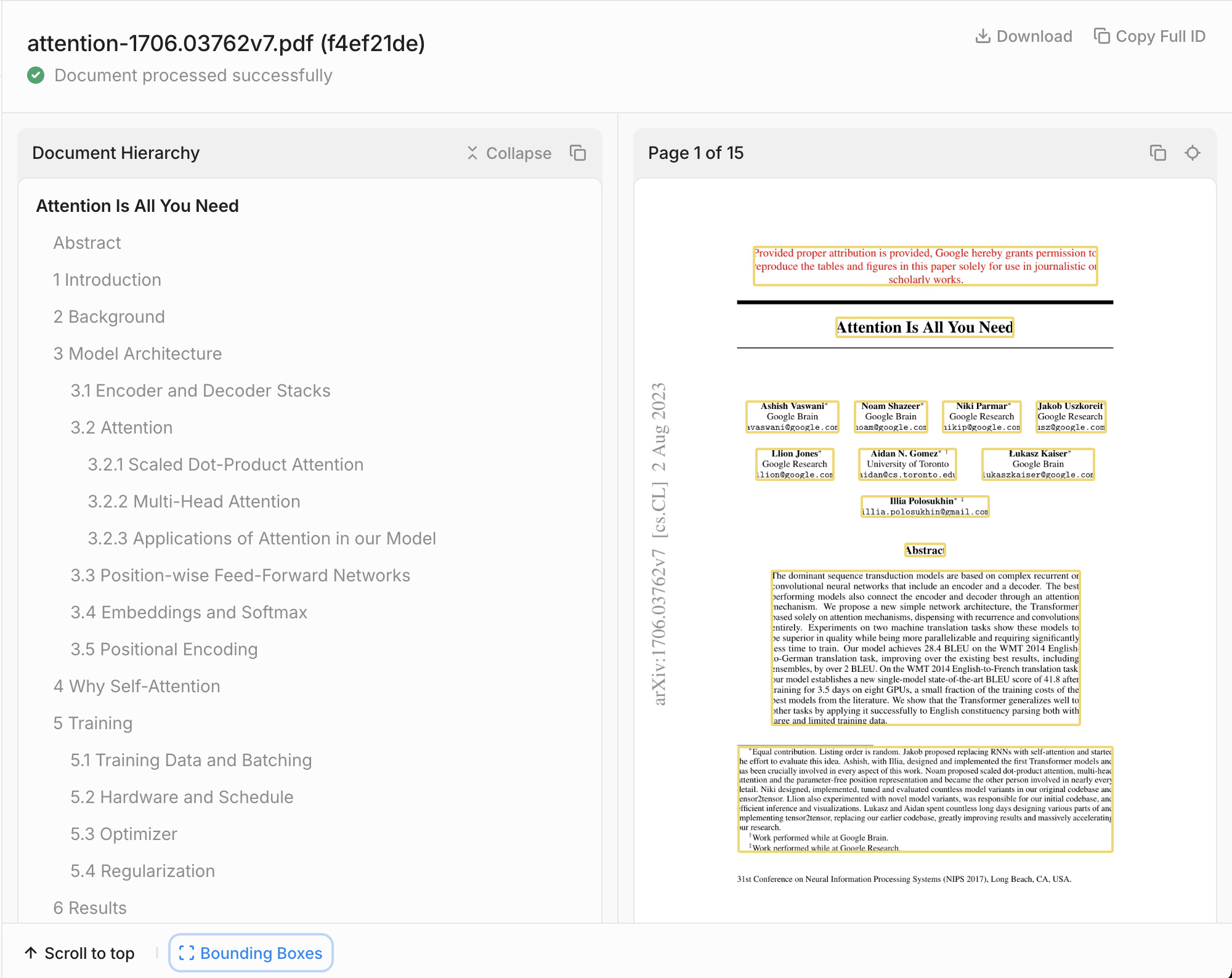
#Document Hierarchy
Unlike traditional parsers, Contextual AI's solution understands how each page fits within the document's holistic structure and hierarchy, enabling AI agents to navigate long, complex documents with the same understanding a human would have. We automatically infer a document's hierarchy and structure, which enables developers to add metadata to each chunk that describes its position in the document. This improves retrieval and allows agents to understand how different sections relate to each other to provide answers that connect information across hundreds of pages.
For more information about Contextual AI's document parser, you can read this blog.
Now, let's use ContextualAI's parser to parse the landmark "Attention is All You Need" paper to demonstrate the parser's capabilities.
# Download the Attention is All You Need paper from arXiv
url = "https://arxiv.org/pdf/1706.03762"
file_path = "data/attention-is-all-you-need.pdf"

with open(file_path, "wb") as f:
    f.write(requests.get(url).content)

print(f"Downloaded paper to {file_path}")
Downloaded paper to data/attention-is-all-you-need.pdf
We'll configure the parser with the following settings:
- parse_mode: "standard" for complex documents that require VLMs and OCR
- figure_caption_mode: "concise" for brief figure descriptions
- enable_document_hierarchy: True to capture document structure
- page_range: "0-5" to parse the first 6 pages
# Setup headers for direct API calls
base_url = "https://api.contextual.ai/v1"
headers = {
    "accept": "application/json",
    "authorization": f"Bearer {API_KEY}"
}

# Submit parse job
url = f"{base_url}/parse"

config = {
    "parse_mode": "standard",
    "figure_caption_mode": "concise",
    "enable_document_hierarchy": True,
    "page_range": "0-5",
}

with open(file_path, "rb") as fp:
    file = {"raw_file": fp}
    result = requests.post(url, headers=headers, data=config, files=file)
    response = json.loads(result.text)

job_id = response['job_id']
print(f"Parse job submitted with ID: {job_id}")
Parse job submitted with ID: c447079c-408e-4d57-927b-c935b49e04d2
Now let's retrieve the parsed results. The parser provides multiple output types:
- Markdown-document: A single Markdown for the entire document
- Markdown-per-page: A list of Markdowns for each page of the document
- Blocks-per-page: Structured JSON representations of content blocks sorted by reading order
# Get the parse results
url = f"{base_url}/parse/jobs/{job_id}/results"

output_types = ["markdown-per-page"]

result = requests.get(
    url,
    headers=headers,
    params={"output_types": ",".join(output_types)},
)

result = json.loads(result.text)
print(f"Parse job is {result['status']}.")
Parse job is completed.
When the parse job is completed (e.g., the above status is "Parse job is completed. "), we can examine the parsed content from the first page of the paper:
# Display the first page's parsed markdown
if 'pages' in result and len(result['pages']) > 0:
    display(Markdown(result['pages'][0]['markdown']))
else:
    print("No parsed content available. Please check if the job completed successfully.")
<IPython.core.display.Markdown object>
To see job results in an interactive manner and submit new jobs, navigate to the UI using the following link by running the cell below. Note you'll need to change "your-tenant-name" to your tenant.
tenant = "your-tenant-name"
print(f"https://app.contextual.ai/{tenant}/components/parse?job={job_id}")
https://app.contextual.ai/your-tenant-name/components/parse?job=c447079c-408e-4d57-927b-c935b49e04d2
For more example code for Contextual AI's Parser, see our parse examples notebook
#2. Instruction-Following Reranker
Enterprise RAG systems often deal with conflicting information in their knowledge bases. Marketing materials can conflict with product materials, documents in Google Drive could conflict with those in Microsoft Office, Q2 notes conflict with Q1 notes, and so on. You can tell our reranker how to resolve these conflicts with instructions like:
- "Prioritize internal sales documents over market analysis reports. More recent documents should be weighted higher. Enterprise portal content supersedes distributor communications."
- "Emphasize forecasts from top-tier investment banks. Recent analysis should take precedence. Disregard aggregator sites and favor detailed research notes over news summaries."
This enables an unprecedented level of control that improves RAG performance significantly.
#State-of-the-Art Performance
Contextual AI's SOTA reranker (v2) is the most accurate in the world with or without instructions – outperforming competitors by large margins on the industry-standard BEIR benchmark (V1), our internal financial and field engineering datasets (V1), and our novel instruction-following reranker evaluation datasets (V1).
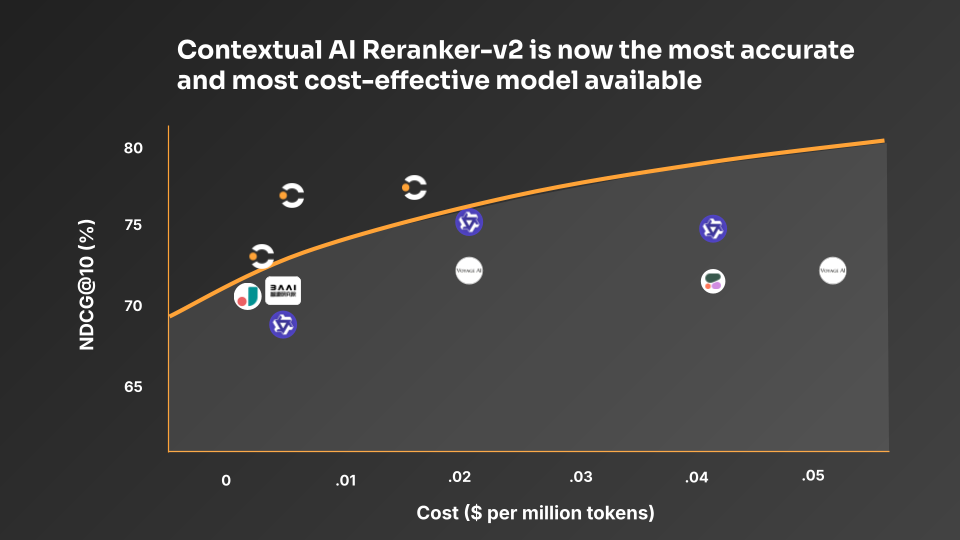
For more information about Contextual AI's reranker V2, you can read this blog, where we also share links to open-source weights and our novel evaluation dataset.
For more information about Contextual AI's reranker V1, you can read this blog.
Let's demonstrate the reranker's instruction-following capabilities with a realistic enterprise scenario. We'll use a query about enterprise GPU pricing and see how the reranker handles conflicting information based on our instructions.
# Define our query and instruction
query = "What is the current enterprise pricing for the RTX 5090 GPU for bulk orders?"

instruction = "Prioritize internal sales documents over market analysis reports. More recent documents should be weighted higher. Enterprise portal content supersedes distributor communications."

# Sample documents with conflicting information
documents = [
    "Following detailed cost analysis and market research, we have implemented the following changes: AI training clusters will see a 15% uplift in raw compute performance, enterprise support packages are being restructured, and bulk procurement programs (100+ units) for the RTX 5090 Enterprise series will operate on a $2,899 baseline.",
    "Enterprise pricing for the RTX 5090 GPU bulk orders (100+ units) is currently set at $3,100-$3,300 per unit. This pricing for RTX 5090 enterprise bulk orders has been confirmed across all major distribution channels.",
    "RTX 5090 Enterprise GPU requires 450W TDP and 20% cooling overhead."
]

# Metadata that helps distinguish document sources and dates
metadata = [
    "Date: January 15, 2025. Source: NVIDIA Enterprise Sales Portal. Classification: Internal Use Only",
    "TechAnalytics Research Group. 11/30/2023.",
    "January 25, 2025; NVIDIA Enterprise Sales Portal; Internal Use Only"
]

# Use the instruction-following reranker model
model = "ctxl-rerank-en-v1-instruct"
Now let's see how the reranker processes our query and instructions to properly rank the documents:
# Execute the reranking
rerank_response = client.rerank.create(
    query=query,
    instruction=instruction,
    documents=documents,
    metadata=metadata,
    model=model
)

print("Reranking Results:")
print("=" * 50)
print(rerank_response.to_dict())
Reranking Results:
==================================================
{'results': [{'index': 0, 'relevance_score': 0.99995809}, {'index': 1, 'relevance_score': 0.99911428}, {'index': 2, 'relevance_score': 0.99082611}]}
Let's examine how the reranker prioritized the documents based on our instructions:
# Display ranked results in a more readable format
print("\nRanked Documents (by relevance score):")
print("=" * 60)

for i, result in enumerate(rerank_response.results):
    doc_index = result.index
    score = result.relevance_score

    print(f"\nRank {i+1}: Score {score:.4f}")
    print(f"Document {doc_index + 1}:")
    print(f"Content: {documents[doc_index][:100]}...")
    print(f"Metadata: {metadata[doc_index]}")
    print("-" * 40)
Ranked Documents (by relevance score): ============================================================ Rank 1: Score 1.0000 Document 1: Content: Following detailed cost analysis and market research, we have implemented the following changes: AI ... Metadata: Date: January 15, 2025. Source: NVIDIA Enterprise Sales Portal. Classification: Internal Use Only ---------------------------------------- Rank 2: Score 0.9991 Document 2: Content: Enterprise pricing for the RTX 5090 GPU bulk orders (100+ units) is currently set at $3,100-$3,300 p... Metadata: TechAnalytics Research Group. 11/30/2023. ---------------------------------------- Rank 3: Score 0.9908 Document 3: Content: RTX 5090 Enterprise GPU requires 450W TDP and 20% cooling overhead.... Metadata: January 25, 2025; NVIDIA Enterprise Sales Portal; Internal Use Only ----------------------------------------
Let's compare how the same documents are ranked without specific instructions to see the difference:
# Rerank without instructions for comparison
rerank_no_instruction = client.rerank.create(
    query=query,
    documents=documents,
    metadata=metadata,
    model=model
)

print("\nRanking WITHOUT Instructions:")
print("=" * 50)

for i, result in enumerate(rerank_no_instruction.results):
    doc_index = result.index
    score = result.relevance_score

    print(f"Rank {i+1}: Document {doc_index + 1}, Score: {score:.4f}")

print("\nRanking WITH Instructions:")
print("=" * 50)

for i, result in enumerate(rerank_response.results):
    doc_index = result.index
    score = result.relevance_score

    print(f"Rank {i+1}: Document {doc_index + 1}, Score: {score:.4f}")
Ranking WITHOUT Instructions: ================================================== Rank 1: Document 2, Score: 0.9998 Rank 2: Document 1, Score: 0.9989 Rank 3: Document 3, Score: 0.6510 Ranking WITH Instructions: ================================================== Rank 1: Document 1, Score: 1.0000 Rank 2: Document 2, Score: 0.9991 Rank 3: Document 3, Score: 0.9908
For more example code for Contextual AI's Reranker V2, see our reranker examples notebook
#3. Grounded Language Model (GLM)
Contextual AI's Grounded Language Model (GLM) is the most grounded language model in the world, engineered specifically to minimize hallucinations for RAG and agentic use cases.
With state-of-the-art performance on FACTS (the leading groundedness benchmark) and our customer datasets, the GLM is the single best language model for RAG and agentic use cases for which minimizing hallucinations is critical. You can trust that the GLM will stick to the knowledge sources you give it.
In enterprise AI applications, hallucinations from the LLM pose a critical risk that can degrade customer experience, damage company reputation, and misguide business decisions. Yet the ability to hallucinate is seen as a useful feature in general-purpose foundation models, especially in serving consumer queries that require creative, novel responses. In contrast, the GLM is engineered specifically to minimize hallucinations for RAG and agentic use cases – delivering precise responses that are strongly grounded in and attributable to specific retrieved source data, not its parametric knowledge learned from training data.
#Groundedness Definition
"Groundedness" refers to the degree to which an LLM's generated output is supported by and accurately reflects the retrieved information provided to it. Given a query and a set of documents, a grounded model either responds only with relevant information from the documents or declines to answer if the documents are not relevant. In contrast, an ungrounded model may hallucinate based on patterns learned from its training data.
For more information about GLM, you can read this blog.
Let's demonstrate the GLM's ability to generate grounded responses using comprehensive knowledge sources about renewable energy in developing nations.
# Example conversation messages
messages = [
    {
        "role": "user",
        "content": "What are the most promising renewable energy technologies for addressing climate change in developing nations?"
    },
    {
        "role": "assistant",
        "content": "Based on current research, solar and wind power show significant potential for developing nations due to decreasing costs and scalability. Would you like to know more about specific implementation challenges and success stories?"
    },
    {
        "role": "user",
        "content": "Yes, please tell me about successful solar implementations in Africa and their economic impact, particularly focusing on rural electrification."
    }
]

# Detailed knowledge sources with varied information
knowledge = [
    """According to the International Renewable Energy Agency (IRENA) 2023 report:
    - Solar PV installations in Africa reached 10.4 GW in 2022
    - The cost of solar PV modules decreased by 80% between 2010 and 2022
    - Rural electrification projects have provided power to 17 million households""",

    """Case Study: Rural Electrification in Kenya (2020-2023)
    - 2.5 million households connected through mini-grid systems
    - Average household income increased by 35% after electrification
    - Local businesses reported 47% growth in revenue
    - Education outcomes improved with 3 additional study hours per day""",

    """Economic Analysis of Solar Projects in Sub-Saharan Africa:
    - Job creation: 25 jobs per MW of installed capacity
    - ROI average of 12-15% for mini-grid projects
    - Reduced energy costs by 60% compared to diesel generators
    - Carbon emissions reduction: 2.3 million tonnes CO2 equivalent""",

    """Technical Specifications and Best Practices:
    - Optimal solar panel efficiency in African climate conditions: 15-22%
    - Battery storage requirements: 4-8 kWh per household
    - Maintenance costs: $0.02-0.04 per kWh
    - Expected system lifetime: 20-25 years""",

    """Social Impact Assessment:
    - Women-led businesses increased by 45% in electrified areas
    - Healthcare facilities reported 72% improvement in service delivery
    - Mobile money usage increased by 60%
    - Agricultural productivity improved by 28% with electric irrigation"""
]
Now let's use the GLM to generate a grounded response based on the provided knowledge sources:
# Setup for direct API call
base_url = "https://api.contextual.ai/v1"
generate_api_endpoint = f"{base_url}/generate"

headers = {
    "accept": "application/json",
    "content-type": "application/json",
    "authorization": f"Bearer {API_KEY}"
}

# Configure the GLM request
payload = {
    "model": "v1",
    "messages": messages,
    "knowledge": knowledge,
    "avoid_commentary": False,
    "max_new_tokens": 1024,
    "temperature": 0,
    "top_p": 0.9
}

# Generate the response
generate_response = requests.post(generate_api_endpoint, json=payload, headers=headers)

print("GLM Grounded Response:")
print("=" * 50)
print(generate_response.json()['response'])
GLM Grounded Response: ================================================== Let me share the current state of solar energy implementation in Africa, focusing on rural electrification and its economic impact: Africa has seen significant solar PV adoption, with total installations reaching 10.4 GW by 2022, supported by an 80% decrease in solar PV module costs between 2010 and 2022. The impact on rural electrification has been particularly noteworthy: Key achievements include: - 17 million households have gained access to electricity through rural electrification projects - In Kenya specifically, 2.5 million households have been connected through mini-grid systems between 2020-2023 The economic benefits have been substantial: Direct economic impacts include: - Average household income increased by 35% after electrification - Local businesses experienced 47% revenue growth - Solar projects create approximately 25 jobs per MW of installed capacity - Mini-grid projects typically achieve a 12-15% return on investment - Energy costs have been reduced by 60% compared to traditional diesel generators The broader social and economic transformation is also significant: Social and economic improvements include: - 45% increase in women-led businesses in electrified areas - 72% improvement in healthcare facility service delivery - 60% increase in mobile money usage - 28% improvement in agricultural productivity with electric irrigation From a technical perspective, the implementations have proven sustainable: Technical performance metrics show: - Systems maintain efficiency of 15-22% in African climate conditions - Expected system lifetimes of 20-25 years - Maintenance costs are relatively low at $0.02-0.04 per kWh These statistics demonstrate the transformative potential of solar energy in African rural development, offering both economic benefits and improved quality of life.
The GLM has an avoid_commentary flag to control groundedness. Let's see how this affects the response:
# Generate response with avoid_commentary enabled
payload_no_commentary = payload.copy()
payload_no_commentary["avoid_commentary"] = True

generate_response_no_commentary = requests.post(generate_api_endpoint, json=payload_no_commentary, headers=headers)

print("GLM Response (with avoid_commentary=True):")
print("=" * 50)
print(generate_response_no_commentary.json()['response'])
GLM Response (with avoid_commentary=True): ================================================== Africa has seen significant solar energy adoption, with total solar PV installations reaching 10.4 GW by 2022, driven by an 80% decrease in solar module costs since 2010. These efforts have already provided electricity to 17 million households through rural electrification projects. In Kenya, a notable case study from 2020-2023 demonstrated substantial economic benefits: - 2.5 million households were connected through mini-grid systems - Average household income increased by 35% - Local businesses saw 47% revenue growth - Students gained 3 additional study hours per day The economic impact extends beyond individual households: - Solar projects create 25 jobs per MW of installed capacity - Mini-grid projects typically achieve 12-15% ROI - Energy costs have been reduced by 60% compared to diesel generators - These initiatives have resulted in 2.3 million tonnes CO2 equivalent in emissions reduction The social impact has been particularly significant: - Women-led businesses increased by 45% in electrified areas - Healthcare facilities reported a 72% improvement in service delivery - Mobile money usage increased by 60% - Agricultural productivity improved by 28% with electric irrigation From a technical perspective, these systems have proven reliable with: - 20-25 year system lifetimes - Maintenance costs of $0.02-0.04 per kWh - Optimal solar panel efficiency of 15-22% in African climate conditions
Let's compare the two responses to understand the difference:
print("COMPARISON:")
print("=" * 60)
print("\n1. Standard GLM Response (avoid_commentary=False):")
print("-" * 50)
print(generate_response.json()['response'])

print("\n\n2. Strict Grounding Mode (avoid_commentary=True):")
print("-" * 50)
print(generate_response_no_commentary.json()['response'])

print("\n\nKey Differences:")
print("- Standard mode may include helpful context and commentary")
print("- Strict mode focuses purely on information from knowledge sources")
print("- Both modes maintain strong grounding in provided sources")
COMPARISON: ============================================================ 1. Standard GLM Response (avoid_commentary=False): -------------------------------------------------- Let me share the current state of solar energy implementation in Africa, focusing on rural electrification and its economic impact: Africa has seen significant solar PV adoption, with total installations reaching 10.4 GW by 2022, supported by an 80% decrease in solar PV module costs between 2010 and 2022. The impact on rural electrification has been particularly noteworthy: Key achievements include: - 17 million households have gained access to electricity through rural electrification projects - In Kenya specifically, 2.5 million households have been connected through mini-grid systems between 2020-2023 The economic benefits have been substantial: Direct economic impacts include: - Average household income increased by 35% after electrification - Local businesses experienced 47% revenue growth - Solar projects create approximately 25 jobs per MW of installed capacity - Mini-grid projects typically achieve a 12-15% return on investment - Energy costs have been reduced by 60% compared to traditional diesel generators The broader social and economic transformation is also significant: Social and economic improvements include: - 45% increase in women-led businesses in electrified areas - 72% improvement in healthcare facility service delivery - 60% increase in mobile money usage - 28% improvement in agricultural productivity with electric irrigation From a technical perspective, the implementations have proven sustainable: Technical performance metrics show: - Systems maintain efficiency of 15-22% in African climate conditions - Expected system lifetimes of 20-25 years - Maintenance costs are relatively low at $0.02-0.04 per kWh These statistics demonstrate the transformative potential of solar energy in African rural development, offering both economic benefits and improved quality of life. 2. Strict Grounding Mode (avoid_commentary=True): -------------------------------------------------- Africa has seen significant solar energy adoption, with total solar PV installations reaching 10.4 GW by 2022, driven by an 80% decrease in solar module costs since 2010. These efforts have already provided electricity to 17 million households through rural electrification projects. In Kenya, a notable case study from 2020-2023 demonstrated substantial economic benefits: - 2.5 million households were connected through mini-grid systems - Average household income increased by 35% - Local businesses saw 47% revenue growth - Students gained 3 additional study hours per day The economic impact extends beyond individual households: - Solar projects create 25 jobs per MW of installed capacity - Mini-grid projects typically achieve 12-15% ROI - Energy costs have been reduced by 60% compared to diesel generators - These initiatives have resulted in 2.3 million tonnes CO2 equivalent in emissions reduction The social impact has been particularly significant: - Women-led businesses increased by 45% in electrified areas - Healthcare facilities reported a 72% improvement in service delivery - Mobile money usage increased by 60% - Agricultural productivity improved by 28% with electric irrigation From a technical perspective, these systems have proven reliable with: - 20-25 year system lifetimes - Maintenance costs of $0.02-0.04 per kWh - Optimal solar panel efficiency of 15-22% in African climate conditions Key Differences: - Standard mode may include helpful context and commentary - Strict mode focuses purely on information from knowledge sources - Both modes maintain strong grounding in provided sources
Let's test how the GLM handles a query when provided with irrelevant knowledge sources:
# Query about a completely different topic
different_query = [
    {
        "role": "user",
        "content": "What are the latest developments in quantum computing hardware?"
    }
]

# Same renewable energy knowledge (irrelevant to quantum computing)
irrelevant_payload = {
    "model": "v1",
    "messages": different_query,
    "knowledge": knowledge,  # Still about renewable energy
    "avoid_commentary": False,
    "max_new_tokens": 512,
    "temperature": 0,
    "top_p": 0.9
}

irrelevant_response = requests.post(generate_api_endpoint, json=irrelevant_payload, headers=headers)

print("GLM Response to Irrelevant Query:")
print("=" * 50)
print("Query: What are the latest developments in quantum computing hardware?")
print("Knowledge provided: Renewable energy information")
print("\nGLM Response:")
print(irrelevant_response.json()['response'])
GLM Response to Irrelevant Query: ================================================== Query: What are the latest developments in quantum computing hardware? Knowledge provided: Renewable energy information GLM Response: I apologize, but I don't have any documentation about quantum computing hardware developments. The information I have access to is entirely focused on renewable energy and solar power implementations in Africa. If you'd like to know about solar energy developments or rural electrification projects, I'd be happy to help with that!
For more example code for Contextual AI's Grounded Language Model, see our GLM examples notebook
#4. LMUnit: Natural Language Unit Testing
Evaluation, while not part of the core RAG pipeline, is a critical component to validating a RAG system before deploying to production. LMUnit is a language model optimized for evaluating natural language unit tests. LMUnit brings the rigor, familiarity, and accessibility of traditional software engineering unit testing to Large Language Model (LLM) evaluation.
LMUnit sets the state of the art for fine-grained evaluation, as measured by FLASK and BiGGen Bench, and performs on par with frontier models for coarse evaluation of long-form responses (per LFQA). The model also demonstrates exceptional alignment with human preferences, ranking in the top 5 of the RewardBench benchmark with 93.5% accuracy.
#Natural Language Unit Tests
A unit test is a specific, clear, testable statement or question in natural language about a desirable quality of an LLM's response. Just as traditional unit tests check individual functions in software, unit tests in this paradigm evaluate discrete qualities of individual model outputs – from basic accuracy and formatting to complex reasoning and domain-specific requirements.
#Types of Unit Tests
- Global unit tests: Applied to all queries in an evaluation set (e.g., "Does the response maintain a formal style?")
- Targeted unit tests: Focused assessment of query-level details (e.g., for "Describe Stephen Curry's legacy" → "Does the response mention that Stephen Curry is the greatest shooter in NBA history?")
For more information about LMUnit, you can read this blog.
Let's start with a basic example to understand how LMUnit works. LMUnit takes three inputs: a query, a response, and a unit test, then produces a continuous score between 1 and 5.
# Simple example
query = "What was NVIDIA's Data Center revenue in Q4 FY25?"

response = """NVIDIA's Data Center revenue for Q4 FY25 was $35,580 million.

This represents a significant increase from the previous quarter (Q3 FY25) when Data Center revenue was $30,771 million.

The full quarterly trend for Data Center revenue in FY25 was:
- Q4 FY25: $35,580 million
- Q3 FY25: $30,771 million
- Q2 FY25: $26,272 million
- Q1 FY25: $22,563 million"""

unit_test = "Does the response avoid unnecessary information?"

# Evaluate with LMUnit
result = client.lmunit.create(
    query=query,
    response=response,
    unit_test=unit_test
)

print(f"Unit Test: {unit_test}")
print(f"Score: {result.score}/5")
print(f"\nAnalysis: The response includes additional quarterly trends beyond the specific Q4 request,")
print(f"which explains the lower score for avoiding unnecessary information.")
Unit Test: Does the response avoid unnecessary information? Score: 1.96/5 Analysis: The response includes additional quarterly trends beyond the specific Q4 request, which explains the lower score for avoiding unnecessary information.
Based on this score, you could adjust your system prompt to specifically exclude any information besides the exact response needed to address the query.
Let's define a comprehensive set of unit tests for evaluating quantitative reasoning responses:
# Define comprehensive unit tests for quantitative reasoning
unit_tests = [
    "Does the response accurately extract specific numerical data from the documents?",
    "Does the agent properly distinguish between correlation and causation?",
    "Are multi-document comparisons performed correctly with accurate calculations?",
    "Are potential limitations or uncertainties in the data clearly acknowledged?",
    "Are quantitative claims properly supported with specific evidence from the source documents?",
    "Does the response avoid unnecessary information?"
]

# Create category mapping for visualization
test_categories = {
    'Does the response accurately extract specific numerical data': 'ACCURACY',
    'Does the agent properly distinguish between correlation and causation': 'CAUSATION',
    'Are multi-document comparisons performed correctly': 'SYNTHESIS',
    'Are potential limitations or uncertainties in the data': 'LIMITATIONS',
    'Are quantitative claims properly supported with specific evidence': 'EVIDENCE',
    'Does the response avoid unnecessary information': 'RELEVANCE'
}

print("Unit Test Framework:")
print("=" * 50)
for i, test in enumerate(unit_tests, 1):
    category = next((v for k, v in test_categories.items() if k.lower() in test.lower()), 'OTHER')
    print(f"{i}. {category}: {test}")
Unit Test Framework: ================================================== 1. ACCURACY: Does the response accurately extract specific numerical data from the documents? 2. CAUSATION: Does the agent properly distinguish between correlation and causation? 3. SYNTHESIS: Are multi-document comparisons performed correctly with accurate calculations? 4. LIMITATIONS: Are potential limitations or uncertainties in the data clearly acknowledged? 5. EVIDENCE: Are quantitative claims properly supported with specific evidence from the source documents? 6. RELEVANCE: Does the response avoid unnecessary information?
We can also create sample prompt-response pairs for evaluation:
# Sample evaluation dataset
evaluation_data = [
    {
        "prompt": "What was NVIDIA's Data Center revenue in Q4 FY25?",
        "response": "NVIDIA's Data Center revenue for Q4 FY25 was $35,580 million. This represents a significant increase from the previous quarter."
    },
    {
        "prompt": "What is the correlation coefficient between Neptune's distance from the Sun and US burglary rates?",
        "response": "According to the Tyler Vigen spurious correlations dataset, there is a correlation coefficient of 0.87 between Neptune's distance from the Sun and US burglary rates. However, this is clearly a spurious correlation with no causal relationship."
    },
    {
        "prompt": "How did NVIDIA's total revenue change from Q1 FY22 to Q4 FY25?",
        "response": "NVIDIA's total revenue grew from $5.66 billion in Q1 FY22 to $60.9 billion in Q4 FY25, representing a massive increase driven primarily by AI and data center demand."
    }
]

eval_df = pd.DataFrame(evaluation_data)
print("Sample Evaluation Dataset:")
print(eval_df.to_string(index=False))
Sample Evaluation Dataset:
prompt response
What was NVIDIA's Data Center revenue in Q4 FY25? NVIDIA's Data Center revenue for Q4 FY25 was $35,580 million. This represents a significant increase from the previous quarter.
What is the correlation coefficient between Neptune's distance from the Sun and US burglary rates? According to the Tyler Vigen spurious correlations dataset, there is a correlation coefficient of 0.87 between Neptune's distance from the Sun and US burglary rates. However, this is clearly a spurious correlation with no causal relationship.
How did NVIDIA's total revenue change from Q1 FY22 to Q4 FY25? NVIDIA's total revenue grew from $5.66 billion in Q1 FY22 to $60.9 billion in Q4 FY25, representing a massive increase driven primarily by AI and data center demand.
Now let's run our unit tests across all evaluation examples:
def run_unit_tests_with_progress(
    df: pd.DataFrame,
    unit_tests: List[str]
) -> List[Dict]:
    """
    Run unit tests with progress tracking and error handling.
    """
    results = []

    for idx in tqdm(range(len(df)), desc="Processing responses"):
        row = df.iloc[idx]
        row_results = []

        for test in unit_tests:
            try:
                result = client.lmunit.create(
                    query=row['prompt'],
                    response=row['response'],
                    unit_test=test
                )

                row_results.append({
                    'test': test,
                    'score': result.score,
                    'metadata': result.metadata if hasattr(result, 'metadata') else None
                })

            except Exception as e:
                print(f"Error with prompt {idx}, test '{test}': {e}")
                row_results.append({
                    'test': test,
                    'score': None,
                    'error': str(e)
                })

        results.append({
            'prompt': row['prompt'],
            'response': row['response'],
            'test_results': row_results
        })

    return results

# Run the evaluation
print("Running comprehensive unit test evaluation...")
results = run_unit_tests_with_progress(eval_df, unit_tests)

# Display detailed results
for i, result in enumerate(results):
    print(f"\n{'='*60}")
    print(f"EVALUATION {i+1}")
    print(f"{'='*60}")
    print(f"Prompt: {result['prompt']}")
    print(f"Response: {result['response'][:100]}...")
    print("\nUnit Test Scores:")

    for test_result in result['test_results']:
        if 'score' in test_result and test_result['score'] is not None:
            category = next((v for k, v in test_categories.items() if k.lower() in test_result['test'].lower()), 'OTHER')
            print(f"  {category}: {test_result['score']:.2f}/5")
        else:
            print(f"  Error: {test_result.get('error', 'Unknown error')}")
Running comprehensive unit test evaluation...
Processing responses: 100%|███████████████████████| 3/3 [00:28<00:00, 9.56s/it]
============================================================
EVALUATION 1
============================================================
Prompt: What was NVIDIA's Data Center revenue in Q4 FY25?
Response: NVIDIA's Data Center revenue for Q4 FY25 was $35,580 million. This represents a significant increase...

Unit Test Scores:
  ACCURACY: 1.86/5
  CAUSATION: 1.43/5
  SYNTHESIS: 1.79/5
  LIMITATIONS: 1.16/5
  EVIDENCE: 1.41/5
  RELEVANCE: 3.75/5

============================================================
EVALUATION 2
============================================================
Prompt: What is the correlation coefficient between Neptune's distance from the Sun and US burglary rates?
Response: According to the Tyler Vigen spurious correlations dataset, there is a correlation coefficient of 0....

Unit Test Scores:
  ACCURACY: 4.20/5
  CAUSATION: 4.90/5
  SYNTHESIS: 2.75/5
  LIMITATIONS: 4.66/5
  EVIDENCE: 3.99/5
  RELEVANCE: 3.75/5

============================================================
EVALUATION 3
============================================================
Prompt: How did NVIDIA's total revenue change from Q1 FY22 to Q4 FY25?
Response: NVIDIA's total revenue grew from $5.66 billion in Q1 FY22 to $60.9 billion in Q4 FY25, representing ...

Unit Test Scores:
  ACCURACY: 3.24/5
  CAUSATION: 2.76/5
  SYNTHESIS: 3.18/5
  LIMITATIONS: 1.15/5
  EVIDENCE: 1.99/5
  RELEVANCE: 3.60/5
Let's create polar plots to visualize the unit test results:
def map_test_to_category(test_question: str) -> str:
    """Map the full test question to its category."""
    for key, value in test_categories.items():
        if key.lower() in test_question.lower():
            return value
    return None

def create_unit_test_plots(results: List[Dict], test_indices: Optional[List[int]] = None):
    """
    Create polar plot(s) for unit test results.
    """
    if test_indices is None:
        test_indices = list(range(len(results)))
    elif isinstance(test_indices, int):
        test_indices = [test_indices]

    categories = ['ACCURACY', 'CAUSATION', 'SYNTHESIS', 'LIMITATIONS', 'EVIDENCE', 'RELEVANCE']
    angles = np.linspace(0, 2*np.pi, len(categories), endpoint=False)
    angles = np.concatenate((angles, [angles[0]]))

    num_plots = len(test_indices)
    fig = plt.figure(figsize=(6 * num_plots, 6))

    for plot_idx, result_idx in enumerate(test_indices):
        result = results[result_idx]
        ax = plt.subplot(1, num_plots, plot_idx + 1, projection='polar')

        scores = []
        for category in categories:
            score = None
            for test_result in result['test_results']:
                mapped_category = map_test_to_category(test_result['test'])
                if mapped_category == category:
                    score = test_result['score']
                    break
            scores.append(score if score is not None else 0)

        scores = np.concatenate((scores, [scores[0]]))

        ax.plot(angles, scores, 'o-', linewidth=2, color='blue')
        ax.fill(angles, scores, alpha=0.25, color='blue')
        ax.set_xticks(angles[:-1])
        ax.set_xticklabels(categories)
        ax.set_ylim(0, 5)
        ax.grid(True)

        for angle, score, category in zip(angles[:-1], scores[:-1], categories):
            ax.text(angle, score + 0.2, f'{score:.1f}', ha='center', va='bottom')

        prompt = result['prompt'][:50] + "..." if len(result['prompt']) > 50 else result['prompt']
        ax.set_title(f"Evaluation {result_idx + 1}\n{prompt}", pad=20)

    plt.tight_layout()
    return fig

# Create visualizations
if len(results) > 0:
    fig = create_unit_test_plots(results)
    plt.show()
else:
    print("No results to visualize")
Let's analyze the overall performance across all categories:
# Create aggregate analysis
all_scores = []
for result in results:
    for test_result in result['test_results']:
        if 'score' in test_result and test_result['score'] is not None:
            category = map_test_to_category(test_result['test'])
            all_scores.append({
                'category': category,
                'score': test_result['score'],
                'test': test_result['test']
            })

scores_df = pd.DataFrame(all_scores)

if not scores_df.empty:
    # Calculate average scores by category
    avg_scores = scores_df.groupby('category')['score'].agg(['mean', 'std', 'count']).round(2)

    print("\nAggregate Performance by Category:")
    print("=" * 50)
    print(avg_scores)

    # Overall statistics
    print(f"\nOverall Statistics:")
    print(f"Mean Score: {scores_df['score'].mean():.2f}/5")
    print(f"Standard Deviation: {scores_df['score'].std():.2f}")
    print(f"Total Evaluations: {len(scores_df)}")
else:
    print("No valid scores to analyze")
Aggregate Performance by Category:
==================================================
             mean   std  count
category
ACCURACY     3.10  1.18      3
CAUSATION    3.03  1.75      3
EVIDENCE     2.46  1.35      3
LIMITATIONS  2.32  2.02      3
RELEVANCE    3.70  0.09      3
SYNTHESIS    2.57  0.71      3

Overall Statistics:
Mean Score: 2.87/5
Standard Deviation: 1.23
Total Evaluations: 18
Interestingly, several of our unit tests are tricky to all score high on: if a response ranks high on CAUSATION (Does the agent properly distinguish between correlation and causation) and LIMITATIONS (Are potential limitations or uncertainties in the data clearly acknowledged?), it may be difficul to also score high on RELEVANCE (Does the response avoid unnecessary information?)
You can try all of the analyses above with your own system by generating the responses, and testing those query-response pairs.
For more example code for Contextual AI's LMUnit, see our LMUnit examples notebook